

Boxoft Screen OCR
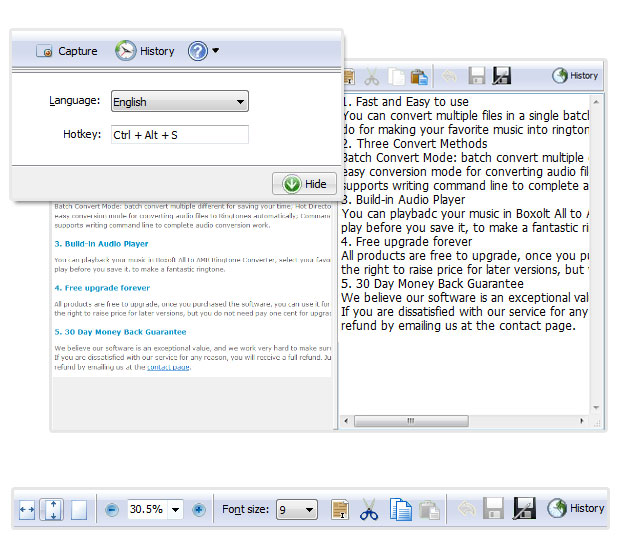
- Boxoft Screen OCR is fast and easy-to-use software which helps to extract any area on your screen, recognize every character and then save as TXT file. The smart tool enables you to select text from anywhere on the screen, including areas that you cannot highlight with your mouse, such as dialog boxes, protected Web pages, PDF files, error messages and so on.
(Boxoft PDF to Flipbook version: For Windows 2000/2003/XP/Vista/7)
(Boxoft PDF to Flipbook for Mac version: For Mac OS 10.5 or above)
- For Windows 2000/2003/XP/Vista/7



|
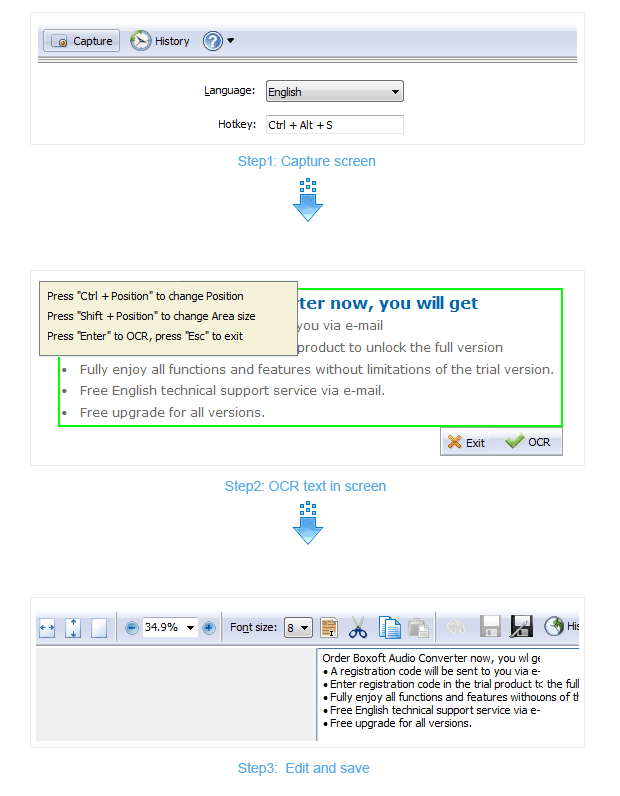
1. Capture text from any part of screenYou can use Boxoft Screen OCR to grab text from anywhere cannot be copied or printed easily, no matter any type of document (PDF, BMP, protected HTML pages) or any window (Dialog Box, Error Massage, Flash). 2. Fast OCR in one clickAfter select text with the rectangular selection tool, you just need to click "OCR", then all characters will be recognized, then you can directly edit it in OCR interface. 3. Simple text editBoxoft Screen OCR provides you simple text edit tools, such as Select All, Cut, Copy, Paste and so on. The edit feature enables you to directly modify extracted text content before saving as text file. 4. Free upgrade foreverAll products are free to upgrade, once you purchased the software, you can use it forever. We keep the right to raise price for later versions, but you do not need pay one cent for upgrading. 5. 30 Day Money Back GuaranteeWe believe our software is an exceptional value, and we work very hard to make sure that is true. If you are dissatisfied with our service for any reason, you will receive a full refund. Just request a refund by emailing us at the contact page. |
|
 |
 |
- Boxoft Screen OCR